
How do Bitcoin mining rigs differ from AI computing rigs?
Before we talk about changes, we need to understand what makes these two worlds so different.
Bitcoin mining uses ASICs designed for one thing: solving SHA-256 hashes. AI computing relies on GPUs that handle parallel floating-point operations. Mining rigs need little RAM or storage. AI rigs require high-end GPUs, fast CPUs, large RAM, SSDs, and stronger cooling.
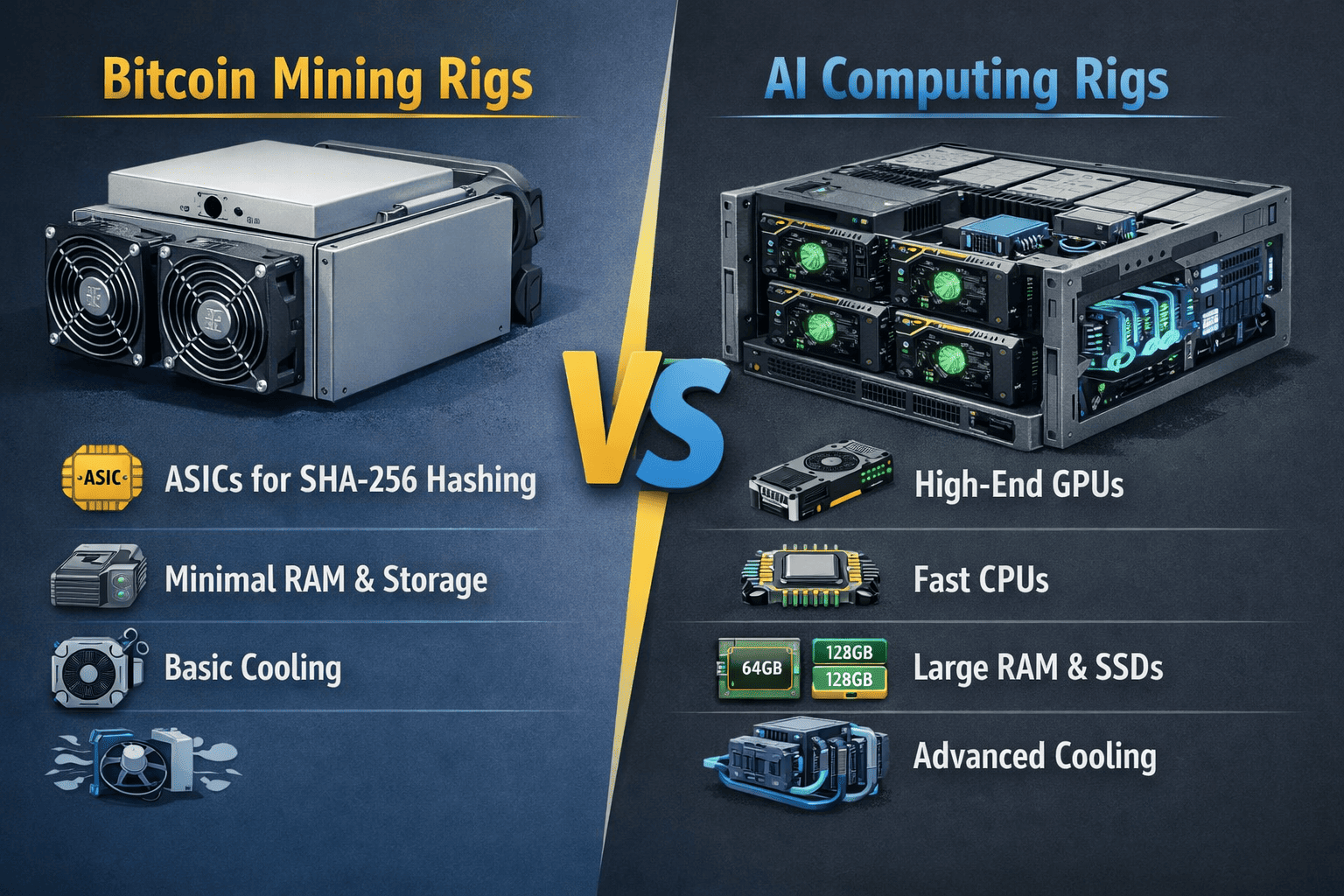
Let me give you a clear comparison:
| Component | Bitcoin Mining Rig | AI Computing Rig |
|---|---|---|
| Primary Processor | ASIC (SHA-256 chip) | High-end GPU (NVIDIA/AMD) |
| System RAM | ~16GB or less | 64GB+ (more for large datasets) |
| Storage | Basic HDD/SSD (OS only) | Fast NVMe SSDs (1TB+) |
| Power Consumption | ~3250W per miner | 300-700W per GPU |
| Flexibility | None – fixed function | High – runs different AI models |
What core hardware components must you replace?
If you decide to move forward, these are the parts you absolutely need to swap out.
You must replace your ASIC miners with high-end GPUs like NVIDIA H100, A100, or RTX 4090. You also need a new CPU and motherboard that support multiple GPUs, at least 64GB of RAM, and fast NVMe SSDs for data storage.
Here is a breakdown of the essential upgrades:
| Component | What to Replace With | Why It Matters |
|---|---|---|
| GPUs | NVIDIA A100/H100 or RTX 4090 | They handle the matrix math AI models need |
| CPU/Motherboard | Intel Xeon or AMD Threadripper | Provides enough PCIe lanes for multiple GPUs |
| RAM | 64GB DDR4/DDR5 or more | Helps process data before it hits the GPUs |
| Storage | NVMe SSD (1TB+) | Loads models and datasets quickly |
| Power Supply | Dual 1500W+ Platinum PSUs | Handles the high draw of multiple GPUs |
GPU Upgrades – The Heart of AI
The most important choice is which GPU to use. Here is a comparison of popular options:
| GPU Model | Architecture | Memory | Typical Use | Power |
|---|---|---|---|---|
| NVIDIA H100 | Hopper | 80GB HBM3 | Large model training | 700W |
| NVIDIA A100 | Ampere | 40/80GB HBM2 | General AI, inference | 250-300W |
| NVIDIA RTX 4090 | Ada Lovelace | 24GB GDDR6X | Development, smaller models | 450W |
| AMD MI250X | CDNA 2 | 128GB HBM2e | HPC, some AI | 500W |
For most setups, NVIDIA GPUs are the standard. They have the software ecosystem that AI developers rely on. Even a gaming GPU like the RTX 4090 with 24GB VRAM works for smaller tasks or learning projects.
CPU and Motherboard Considerations
Mining rigs often use basic CPUs because hash work doesn’t need much. AI training needs a strong CPU with many PCIe lanes. I switched to a server or workstation board – like one built for AMD Threadripper or Intel Xeon. This gives dozens of PCIe lanes to support multiple GPUs at full speed. It also supports large amounts of RAM.
Memory and Storage Requirements
I increased system RAM to at least 64GB. More RAM helps in pre-processing data and running the OS smoothly. Some AI workloads benefit from 128GB or 256GB. For storage, I added a fast NVMe SSD with at least 1TB capacity. AI training needs quick data access. A small miner might have had just a tiny drive; for AI, we use high-speed storage to load models and datasets without bottlenecks.
Which infrastructure upgrades do you need for AI workloads?
AI hardware draws much more power and generates more heat than mining rigs. I learned this when adding GPUs to my own setup – I needed bigger breakers and extra cooling.
AI computing needs more power per square foot than mining. Upgrade to high-wattage PSUs and ensure your facility can handle the load with 208V or 3-phase power. Install enhanced cooling – more fans or liquid cooling – to dissipate GPU heat.
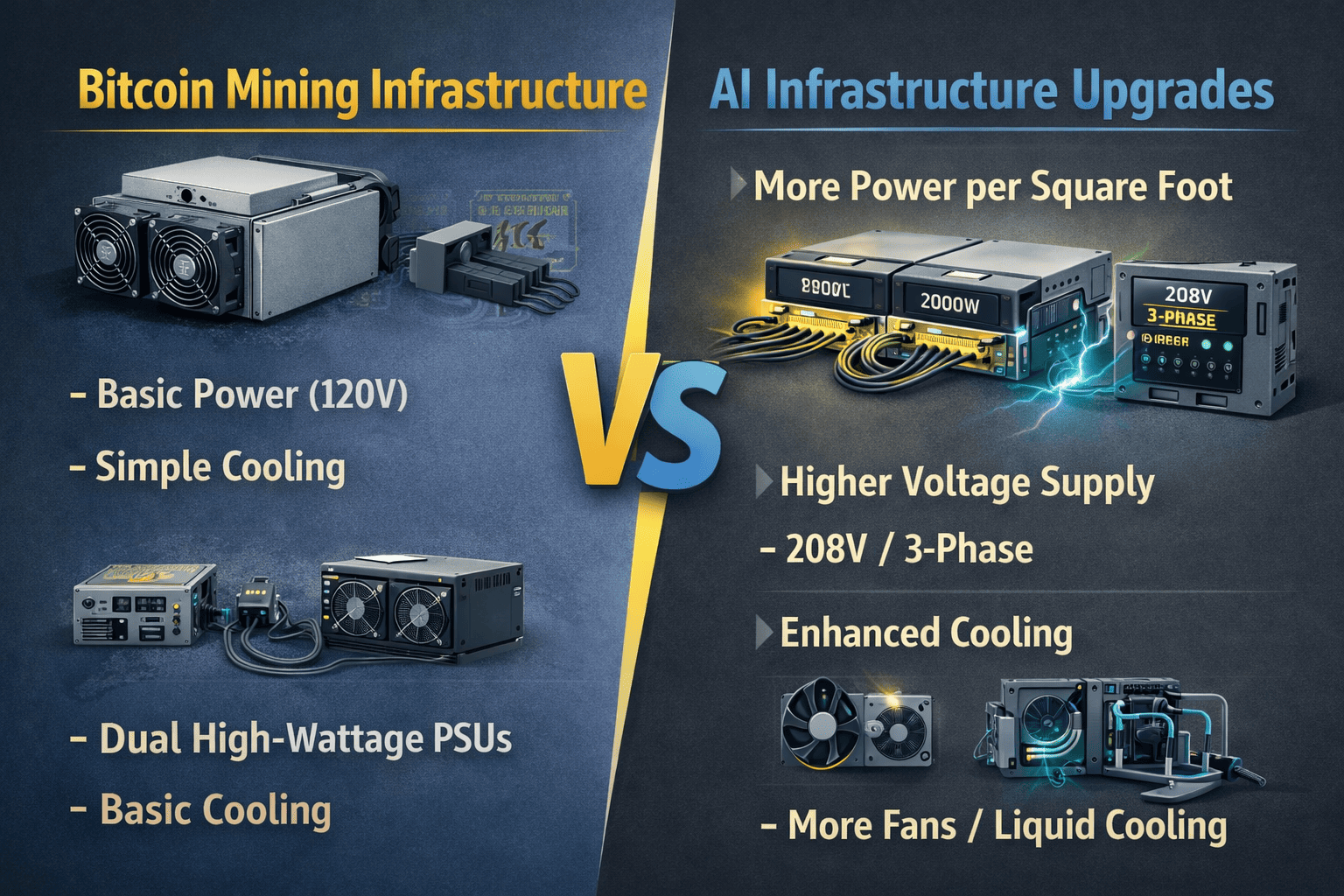
| Upgrade Area | What You Need |
|---|---|
| Power Supply | Dual 1600W-2000W PSUs per server |
| Electrical | 208V or 3-phase circuits, upgraded breakers |
| Cooling | High-CFM fans, liquid cooling for dense setups |
| Racks | Ventilated racks with planned airflow |
Power Delivery Changes
AI servers are dense. One rack might draw 40-60 kW, compared to 10-20 kW for a mining rack. In my own workshop, each GPU draws around 300W. Running 4-6 GPUs requires over 2000W just for the graphics cards. I had to rewire to use 208V circuits. I installed two 1600W PSUs per server to have enough headroom. Breakers and cables were upgraded to handle these loads safely.
Cooling Requirements
GPUs generate a lot of heat under full load. I added high-speed intake and exhaust fans to the case. For very large setups, some miners use liquid cooling. Even with air cooling, spacing the GPUs properly and using good fans made a big difference. Keeping temperatures below the safe limit is crucial – AI workloads can run 24/7 just like mining.
I talked to a miner in Texas who looked into converting his site. He had 5 MW of power capacity. After calculating, he found that with AI servers he could only fit about 2 MW worth of compute because of the higher density per rack. He would have to redo his electrical distribution to support it.
Can any of your existing mining equipment be repurposed?
You might hope to save money by reusing some gear. Let’s see what’s possible.
In almost all cases, none of your ASIC miners can be used for AI. However, some infrastructure – like racks, power distribution units, and certain cooling setups – might be adaptable with modifications.
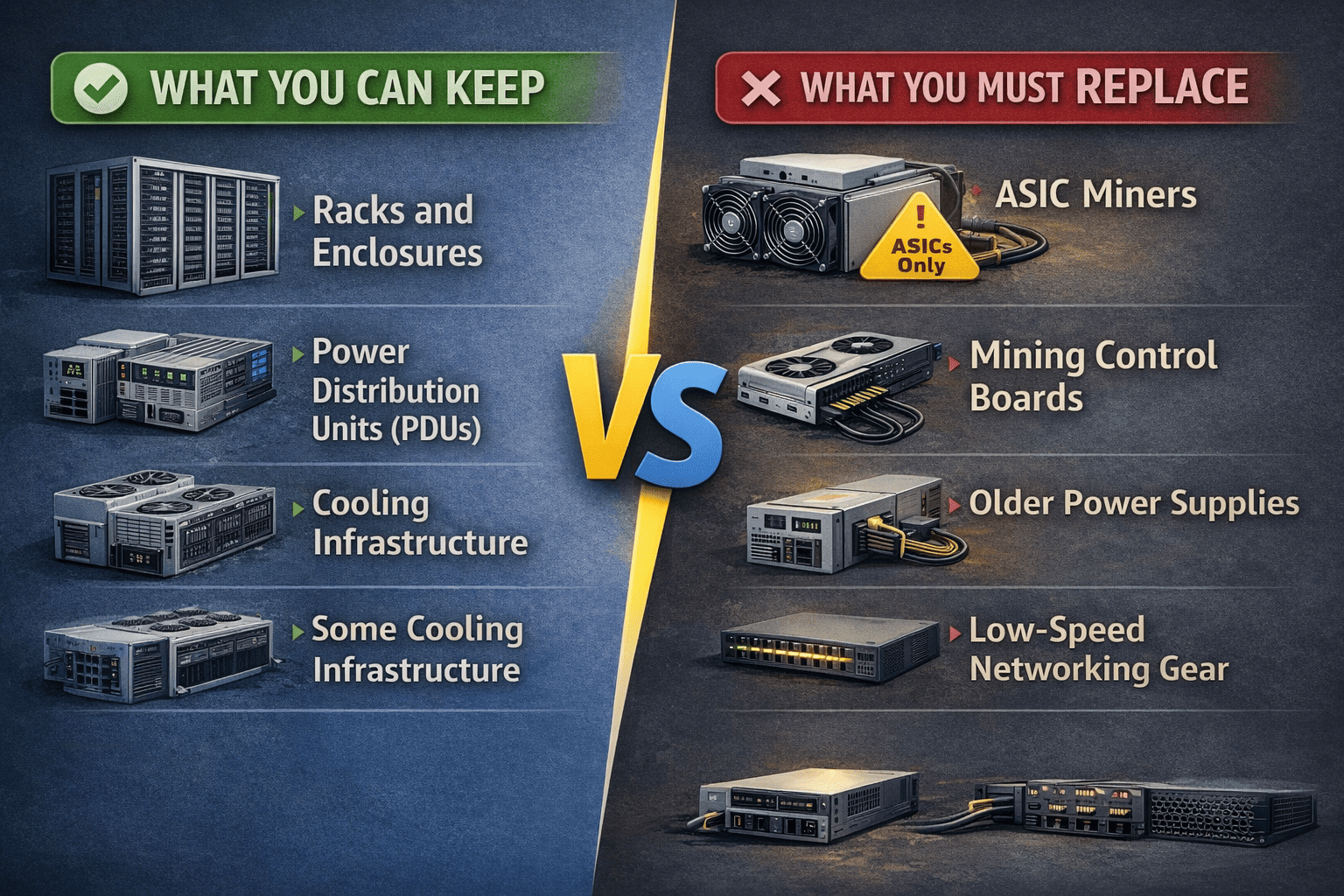
What You Can Keep
Here is a quick list of items that might be reusable:
- Racks and enclosures – If they are standard 19-inch racks, they can hold GPU servers
- Power distribution units (PDUs) – As long as they support the voltage and connector types your new gear needs
- Some cooling infrastructure – For example, if you have a large air-cooling system with good airflow, you might adapt it
- Networking switches – Only if they are high-speed (10GbE or better) and have enough ports
What You Must Replace
The big items that cannot be reused:
- ASIC miners – They are single-purpose and cannot run AI software
- Mining control boards – These are designed to manage ASICs, not GPUs
- Older power supplies – GPU servers often need different voltages or form factors
- Low-speed networking gear – AI clusters require high bandwidth (InfiniBand or 100GbE) for fast data exchange between nodes
I remember visiting a mining farm in Canada. The owner wanted to turn half his facility into an AI data center. He thought he could keep his 4000 S19s and just add some GPUs. But the power density was wrong, the cooling was set for constant high heat, and the networking was only 1GbE. We had to tell him it would be cheaper to build a new facility from scratch.
Is the transition financially worthwhile?
Hardware changes come with significant costs. You need to evaluate if it’s worth it for your situation.
The cost of transitioning to AI can be millions of dollars. For a small rig, you might spend $10,000-$20,000 on upgrades. For a large facility, the investment could reach $50-60 million. Profitability depends on workload, energy costs, and market demand.
The Upfront Costs – Small Scale
Let’s start with a single rig conversion. Suppose you want to build one AI workstation from an old mining frame:
| Component | Estimated Cost |
|---|---|
| 2x NVIDIA RTX 4090 | $3,200 |
| AMD Threadripper CPU + Motherboard | $2,500 |
| 64GB DDR5 RAM | $300 |
| 2TB NVMe SSD | $200 |
| Dual 1600W PSUs | $600 |
| Cooling upgrades | $200 |
| Total | ~$7,000 |
This gives you a capable machine for learning, development, or running smaller models.
The Upfront Costs – Large Scale
Now let’s look at a serious AI cluster. Suppose you want to build a facility with 1,000 H100 GPUs. That is about 125 servers (8 GPUs each). The GPUs alone would cost around $30,000 each, so $30 million just for the GPUs. Add servers, storage, networking, facility upgrades, and you could be looking at $50-60 million.
Ongoing Expenses
Electricity is still a big factor. AI servers run at high utilization, so your power bill will be high. But you also need skilled staff to manage the cluster, software licenses, and cooling maintenance. Unlike mining, which can run with minimal supervision, AI systems need constant tuning and updates.
Potential Revenue
You can rent out AI compute time on cloud platforms or offer services to researchers. The rates vary widely. For example, an H100 might rent for $2-4 per hour on some clouds. If you can keep it booked 80% of the time, the math might work. But you are competing with hyperscalers like AWS and Google who have massive economies of scale.
A Realistic Look
I had a client in Europe who was very excited about AI. He asked me to help him source GPUs. I asked him about his experience with AI software and his target customers. He admitted he had no clients lined up. I suggested he start smaller – maybe rent a few GPUs from a cloud provider first to test the market, or build one small rig to learn the ropes. That way he could understand the space without committing millions.
For many miners, it makes more sense to stick with what you know. The mining market still has opportunities, especially with the right hardware and low electricity costs. At Miner Source, we help clients get the best Antminers and Whatsminers for their operations. If you decide not to pivot, we can keep you supplied with efficient mining rigs.
Conclusion
Switching from bitcoin mining to AI requires replacing almost all your core hardware – ASICs must go, and GPUs, new servers, and faster networking come in. For a single rig, expect to spend $7,000-$20,000 on upgrades. For a large facility, the investment can reach tens of millions. Infrastructure like power and cooling often needs upgrades too. Think carefully before diving in. If you want to stay in mining, we are here to help with the best equipment. Contact MinerSource Team Purchase Asic and GPU now


