
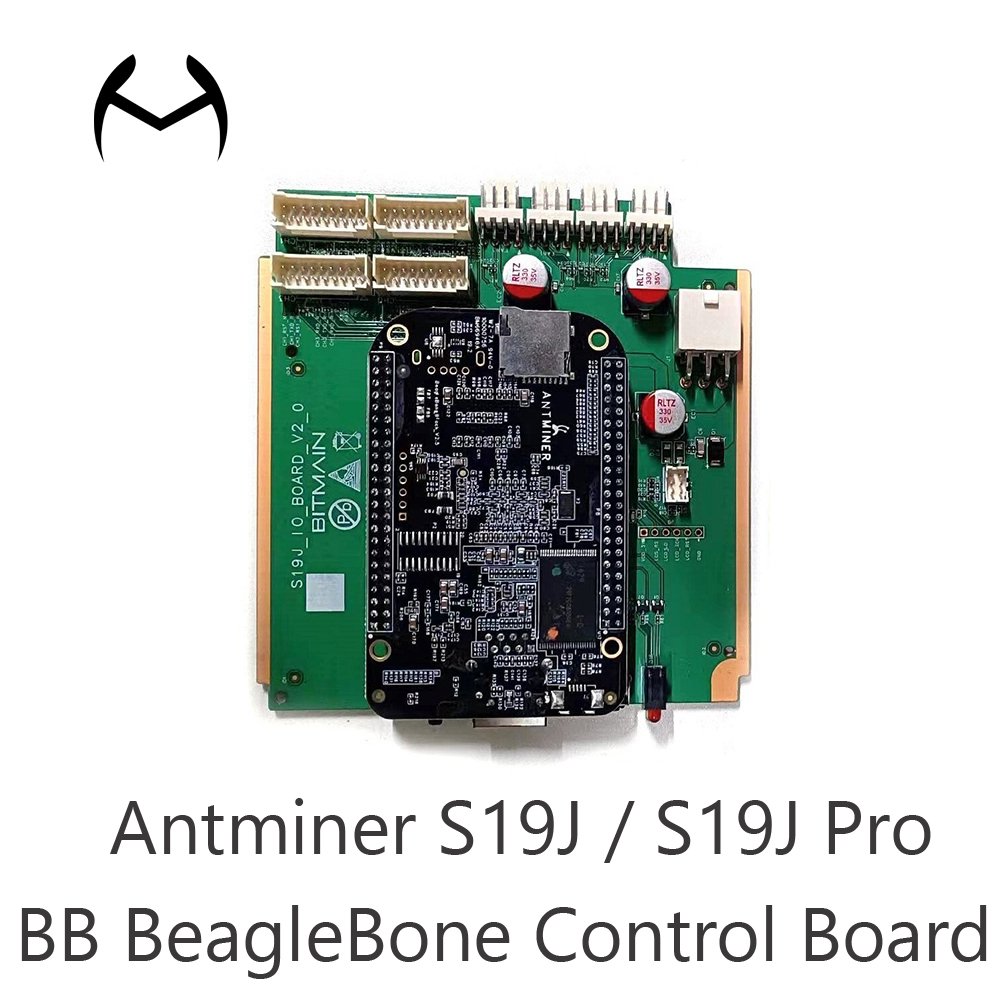
| Parameter | Specification |
|---|---|
| Compatible Models | Bitmain Antminer S19J, S19J Pro |
| Board Type | Combined Control Board (IO + BB BeagleBone) |
| SD Card Slot | Rear-mounted (requires top cover removal for access) |
| Board Composition | IO Board + BB BeagleBone Board |
| Miner Type | Air-cooling SHA-256 Miners |
| Primary Use | Replacement & Repair of Faulty Control Boards |
The Antminer S19J / S19J Pro BB BeagleBone Control Board is a genuine combined control board specifically designed for Bitmain Antminer S19J and S19J Pro air-cooling miners. This comprehensive replacement solution consists of two integrated circuit boards – an IO board and BB BeagleBone board – providing a complete control system replacement for miners lacking front-facing SD card or micro USB slots. Engineered for reliability and compatibility, this control board enables quick restoration of mining operations for malfunctioning S19J series miners.
Dual-Board Integration – Combined IO board and BB BeagleBone board in one unit
Wide Compatibility – Works with most Antminer S19J and S19J Pro models
SD Card Accessibility – Features rear-mounted SD card slot for firmware updates
Direct Replacement – Perfect solution for miners without front SD card/micro USB ports
Rear SD Card Slot – Located on the back of the control board assembly
BeagleBone Technology – Advanced processing capabilities for optimal mining performance
Easy Firmware Updates – TF card swiping capability for simple maintenance
Integrated Design – Streamlined replacement with pre-assembled components
Fault Resolution – Effectively repairs non-functional S19J and S19J Pro miners
Stable Operation – Ensures consistent mining performance post-replacement
Quality Construction – Manufactured to Bitmain’s exacting standards
Easy Installation – Straightforward replacement process for quick deployment
Rear Location – SD card slot positioned on the back of the control board
Top Cover Removal Required – Must open miner top cover to access SD card slot
TF Card Compatibility – Supports standard TF cards for firmware flashing
Easy Maintenance – Straightforward access for regular firmware updates
Complete Board Replacement – Swap entire control board assembly
No Additional Components Needed – Comes as ready-to-install unit
Firmware Ready – Compatible with standard S19J series firmware
Quick Deployment – Minimizes miner downtime during replacement
Non-Functional Miners – Restores operation to completely dead units
Control Board Failures – Replaces damaged or malfunctioning control boards
Firmware Update Issues – Solves problems with corrupted or outdated firmware
Hardware Damage – Addresses physical damage to original control boards
Preventive Maintenance – Proactive replacement of aging control boards
Performance Optimization – Ensures optimal mining efficiency
Hardware Updates – Updates older control boards with latest technology
Cost-Effective Repair – Affordable solution compared to full miner replacement
Power Down – Completely shut down and unplug the miner
Access Interior – Remove the miner’s top cover and protective panels
Identify Faulty Board – Locate and disconnect the existing control board
Install New Board – Connect the combined IO+BB control board assembly
Access SD Slot – Remember SD card slot is on the board’s rear side
Update Firmware – Use TF card for firmware flashing if required
Test Operation – Verify proper miner functionality after installation
SD Card Location – Slot is on the back of the control board, not front-accessible
Cover Removal – Must open top cover to reach SD card slot for firmware updates
Compatibility Check – Verify miner model before installation
Anti-Static Precautions – Use proper ESD protection during installation
Q: Which miner models are compatible with this control board?
A: This combined control board is compatible with most Bitmain Antminer S19J and S19J Pro air-cooling models.
Q: Where is the SD card slot located on this control board?
A: The SD card slot is located on the back of the control board. You need to open the miner’s top cover to access it.
Q: When should I use this combined control board?
A: Use this board when your S19J miner doesn’t have any SD card or micro USB slots on the front, or when replacing a faulty control board.
Q: What components does this control board include?
A: It includes both the IO board and BB BeagleBone board pre-assembled as a complete replacement unit.
Q: How do I update firmware with this control board?
A: You can use a TF card inserted into the rear SD card slot. Remember to open the top cover to access the slot.
Don’t let control board failures stop your mining operations. Restore your Antminer S19J or S19J Pro to full functionality with this genuine combined control board solution.
💡 Perfect For:
Mining farms with multiple S19J series miners
Repair services handling Antminer maintenance
Individual miners experiencing control board failures
Mining operations minimizing downtime and revenue loss


We are Shenzhen China company specializing in providing Bitmain, Whatsminer, Avalon for global miners.
WhatsApp us
We will contact you within 3 hours, please pay attention to the email with the suffix “@minersource.shop”.